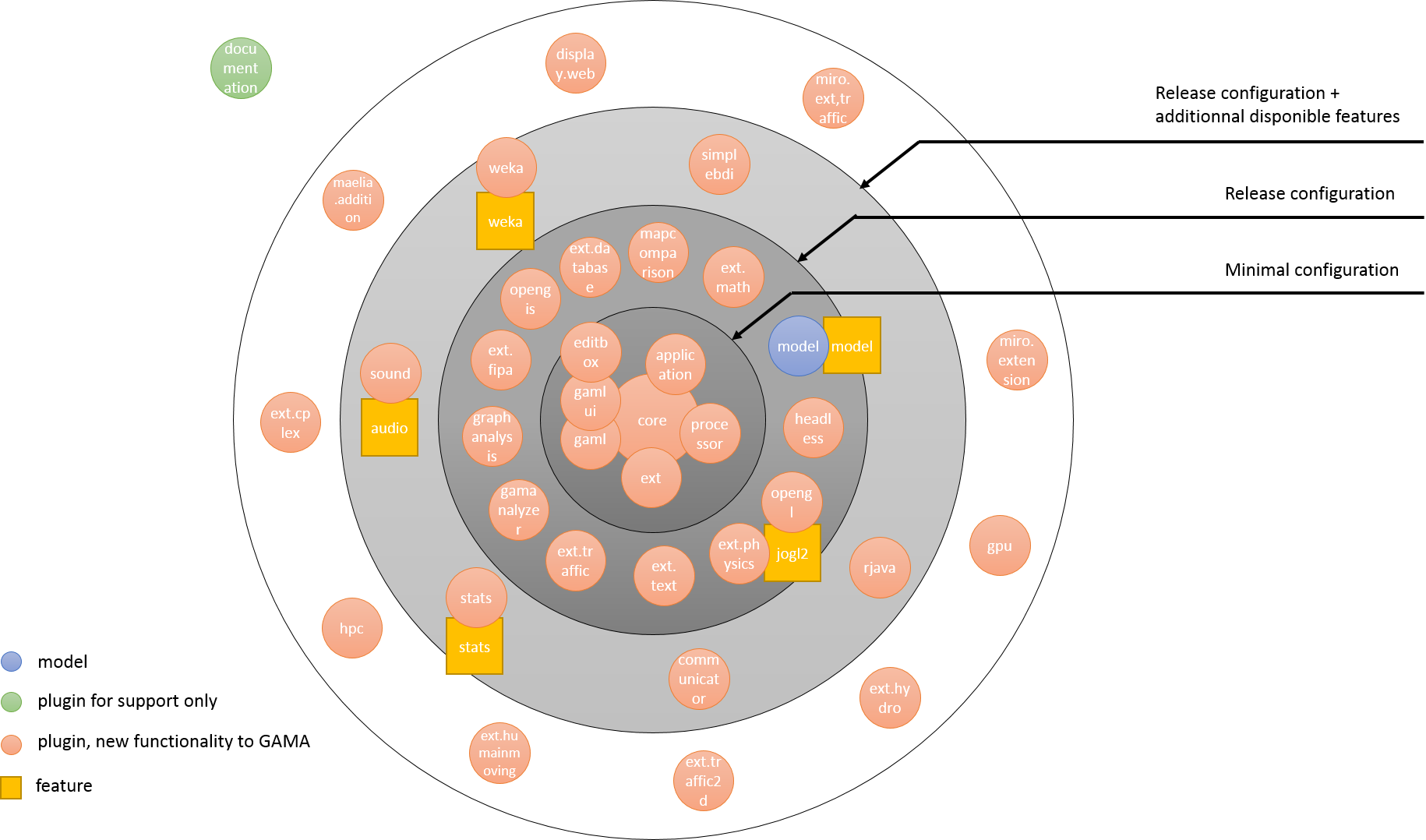
Architecture of GAMA
GAMA is made of a number of Eclipse Java projects, some representing the core projects without which the platform cannot be run, others additional plugins adding functionalities or concepts to the platform.
Vocabulary:
Each project is either designed as a plugin (containing an xml file plugin.xml) or as a feature (containing an xml file feature.xml).
- A plugin can be seen as a module (or bundle in the OSGI architecture), which can be necessary (the GAMA platform can't run without it) or optional (providing new functionalities to the platform). This decomposition between several plugins ensures the cohesion between functional blocks, each plugin has to be as independent as possible.
- A feature is a group of one or several modules (or plugins), which can be loaded. NB: Unlike a plugin, a feature does not include source code, but only metadata files such as
build.propertiesandfeature.xml.
To see how to create a plugin and a feature, please read this page.
The minimal configuration
Here is the list of projects which have to be imported in order to run the GAMA platform, and to execute a simple model in GAML:
gama.core: Encapsulates the core of the modeling and simulation facilities offered by the platform: runtime, simulation, meta-model, data structures, simulation kernel, scheduling, etc. It contains the core runtime and many built-in GAML concepts.gama.ui.application: Describes the graphical user interface entry point. The UI is now split into several plugins instead of being concentrated in a single monolithic UI bundle. The main UI-related plugins are:gama.ui.sharedgama.ui.navigatorgama.ui.editorgama.ui.viewersgama.ui.experimentgama.ui.display.java2dgama.ui.display.opengl
gama.dependencies: Gathers all the external libraries upon which GAMA relies upon.gaml.compiler: Contains the GAML compiler and language integration layer.gama.ui.editor: Contains the current GAML Editor (syntax highlighting, code completion, editing support).
gama.annotations: Contains the annotations used in the Java source code to declare operators, statements, skills, species, types and documentation entries.gama.processor: Is responsible for processing the annotations made in the Java source code and producing additions to GAML (Java, properties and documentation files), which are added into generated sources. These additions are loaded automatically when GAMA launches, allowing extensions made by developers in other plugins to be recognized when their plugin is added to the platform.gama.headless: Enables running simulations in console mode, without the graphical user interface.gama.library: Contains the distributed models, examples and tests shipped with GAMA.
Minimal configuration projects dependencies:

Optional Plugins
Extension plugins present in the release version
From this minimal configuration, it is possible to add some features. Here is the list of the extension plugins installed by default in the release version:
gama.extension.batch: Exploration and calibration methods for batch experimentsgama.extension.bdi: Architecture for using the Belief-Desire-Intention software modelgama.extension.database: Provides database manipulation tools, using SQL requestsgama.extension.fipa: Provides some operators for communication between agents, using the FIPA standardsgama.extension.image: Image type and image manipulation operatorsgama.extension.maths: Solving differential equations, using Euler methods and Runge Kuttagama.extension.network: Network communication between simulations and external programsgama.extension.pedestrian: Skills for pedestrian movement modelinggama.extension.physics: Physics engine, collision modellinggama.extension.serialize: Serialization, save and restore of agents and simulationsgama.extension.sound: Use of sound in simulationsgama.extension.stats: Advanced statistics operatorsgama.extension.traffic: Provides operators and skills for traffic simulation
The display back-ends are provided by dedicated UI plugins:
gama.ui.display.java2d: 2D visualization using Java2Dgama.ui.display.opengl: 3D visualization using OpenGLgama.ui.display.opengl4: The new 3D rendering engine based on the OpenGL 4.1 Core Profile (shader-based)
Community plugins not present in the release version
Community-maintained plugins (R connector, Weka, Matlab, etc.) are developed in separate repositories, primarily under the gama-platform-plugin GitHub organization, and can be installed separately. See Using extensions.
Plugins not designated to be in the release version
Other plugins will never be on the released version, and will never be loaded during the GAMA execution. They are just used in the developer version:
gama.documentation: Generates the documentation automatically in wiki form (and also a PDF file)gama.dev: Development utilities (debugging, benchmarking helpers)
Features
Below is the same section rewritten with the current feature names:
gama.feature.extension.sound: sound plugingama.feature.extension.stats: stats plugingama.feature.ui.experiment: gathers the experiment UI and display plugins (gama.ui.experiment,gama.ui.display.java2d,gama.ui.display.opengl)simtools.graphlayout.feature: gathers core, dependencies, processor and graphanalysis pluginsgama.feature.core: gathers the core runtime plugins such asgama.core,gama.annotations,gama.processor,gaml.compiler,gama.headless, and the main base runtime modulesgama.feature.dependencies: a bundle of libraries and dependency plugins centered ongama.dependenciesgama.feature.extensions: gathers the main extension plugins such as database, fipa, maths, network, pedestrian, physics, serialize, stats and trafficgama.feature.library: model library featureidees.gama.features.weka: weka plugingama.product: gathers the current core, dependencies, library, UI and extension features
You may also want to mention the current UI-oriented features explicitly:
gama.feature.ui: gathers the base UI plugins (gama.ui.application,gama.ui.shared)gama.feature.ui.dependencies: gathers the UI dependency layergama.feature.ui.editor: gathers the editor-oriented UI plugins (gama.ui.editor,gama.ui.navigator,gama.ui.viewers)gama.feature.extension.image: image extension feature
Models
Beside those plugins and features, a project dedicated to gather a bunch of examples is also in the git repository. It contains GAML code:
gama.library
Plugins overview
Global architecture of GAMA (NB: the historical graph is kept below, but it reflects the older architecture and naming scheme, not the exact current gama.* / gama.feature.* structure)